Shopify setup guide
Get photo magnets live on your Shopify store.
Install Vixie, pick a plan, and switch on the app embed. Then your magnet products get a photo upload button, and every order arrives ready to print. It takes about 15 minutes, and you never leave Shopify admin.
Last updated October 2026 · Questions? Email support@vixie.app
Prefer to watch?
Steps 1 to 5 in under 2 minutes.
Before you start
What you'll need
- Your Shopify store, and permission to install apps on it. Store owners have it. Staff need it switched on by the owner
- About 15 minutes. You can stop after any step and pick up where you left off
- A photo of your finished magnets for the product page (optional, you can add it later)
The 7 steps
From the App Store to your first product page.
- 1
Step 1: Install Vixie from the App Store
2 minutesOpen Vixie Photo Magnet & Keepsakes on the Shopify App Store and select Install. Shopify shows what Vixie needs access to: your customers, your staff, and store data like products and orders. Select Install again to approve it.
Vixie sets up your account and connects your store. It only takes a moment.
- 2
Step 2: Already use Vixie? Pick an account
1 minuteIf your Shopify login uses the same email as a Vixie account, you'll see Pick a Vixie Account. Choose the account this store belongs to and select Connect to Shopify, or select Create a new account. If the account you pick has its own Vixie store, that store closes when you connect, and Shopify takes over.
New to Vixie? There's nothing to pick, so you go straight to the next step.
- 3
Step 3: Pick a plan
2 minutesShopify opens Vixie's plan page. Launch is $29 a month and sells on your Shopify store, with up to 200 Vixie orders a month. Growth is $49 a month, with no monthly cap, and adds in-person events with QR ordering. Select Pay yearly to get 2 months free. Pick your plan, then approve the charge.
Both start with a 7-day free trial, and Shopify bills you. Uninstall before it ends and you pay nothing.
- 4
Step 4: Find your way around
1 minuteVixie opens right inside Shopify admin. It lives under Apps in the menu on the left, with Events, Orders, Customers, Products, and the rest of Vixie underneath. The Setup bar at the top of your dashboard lists what's left to do. Want more room? Select Open in a new tab.
Connect your Shopify store is already crossed off. The rest cross off as you finish them.
- 5
Step 5: Switch on the app embed
2 minutesThis is the step people miss. Until the app embed is on, the Magnet Customizer won't show on your store. On the Setup bar, select Enable Vixie in your theme. Your theme editor opens on App embeds. Find Vixie App, switch it on, then select Save.
Back in Vixie, the step is crossed off. It can take a minute to show up after you save.
- 6
Step 6: Link your first product
5 minutesThe Magnet Customizer shows on products that are linked to Vixie. Make a new photo magnet product in Vixie and create it on Shopify, or import one you already sell. The Shopify orders guide walks through both.
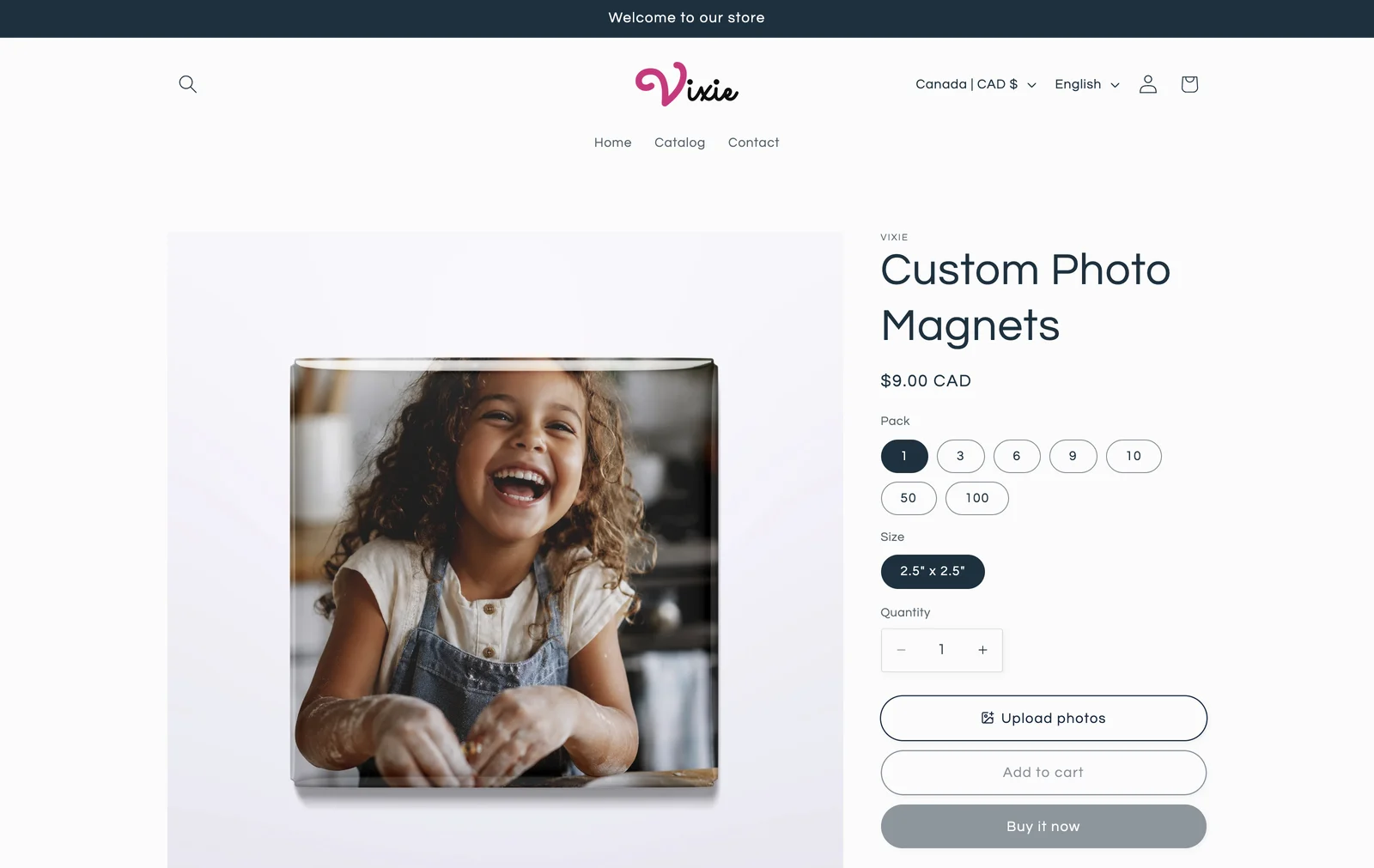
Your product page shows Upload photos, and customers can start ordering.
Link products and take your first order - 7
Step 7: Get your magnet sizes right
10 minutesNo two presses cut at exactly the same size. Select Dial-in your print measurements on the Setup bar to open Print Studio. Pick the size you sell, select Edit Measurements, and print a test sheet at actual size. Nudge a number, select Save, and print another.
Every print at that size uses your measurements. Do it once for each size you sell.
Full size measurements guide
Once it's on
What your customers see.
On every product linked to Vixie, an Upload photos button sits with your other product options. The customer picks a pack, adds their photos, and crops each one to the shape of the magnet. Checkout stays in Shopify.
Customizer offline? If the app embed ever gets switched off, Vixie shows a banner on your dashboard and sends you an email. Switch Vixie App back on in your theme editor and select Save.
Questions
Shopify setup FAQ
How much does Vixie cost on Shopify?+
Is there a free trial?+
Do I need a separate Vixie account?+
Can I change plans later?+
How do I cancel?+
The Upload photos button isn't on my product page. What's wrong?+
What if the app embed gets switched off?+
Can I sell at markets and events too?+
Keep going
Related reads.
Shopify orders, from product to package
Link a product, see what customers do on your product page, then print the order and ship it from Shopify.
Read more →Size measurements · 10 minMagnet size measurements
Annotated walkthrough of every Edit Measurements field, plus a diagnostic table for the test sheet.
Read more →Selling · 8 minSelling photo magnets online
A product page that sells, three ways to get your first order, and the occasions people buy magnets for.
Read more →Ready to sell photo magnets on Shopify?
About 15 minutes from install to your first product page, with a 7-day free trial.
Or see what Vixie does on Shopify →