Vixie for events
Let the line order
from their own phones.
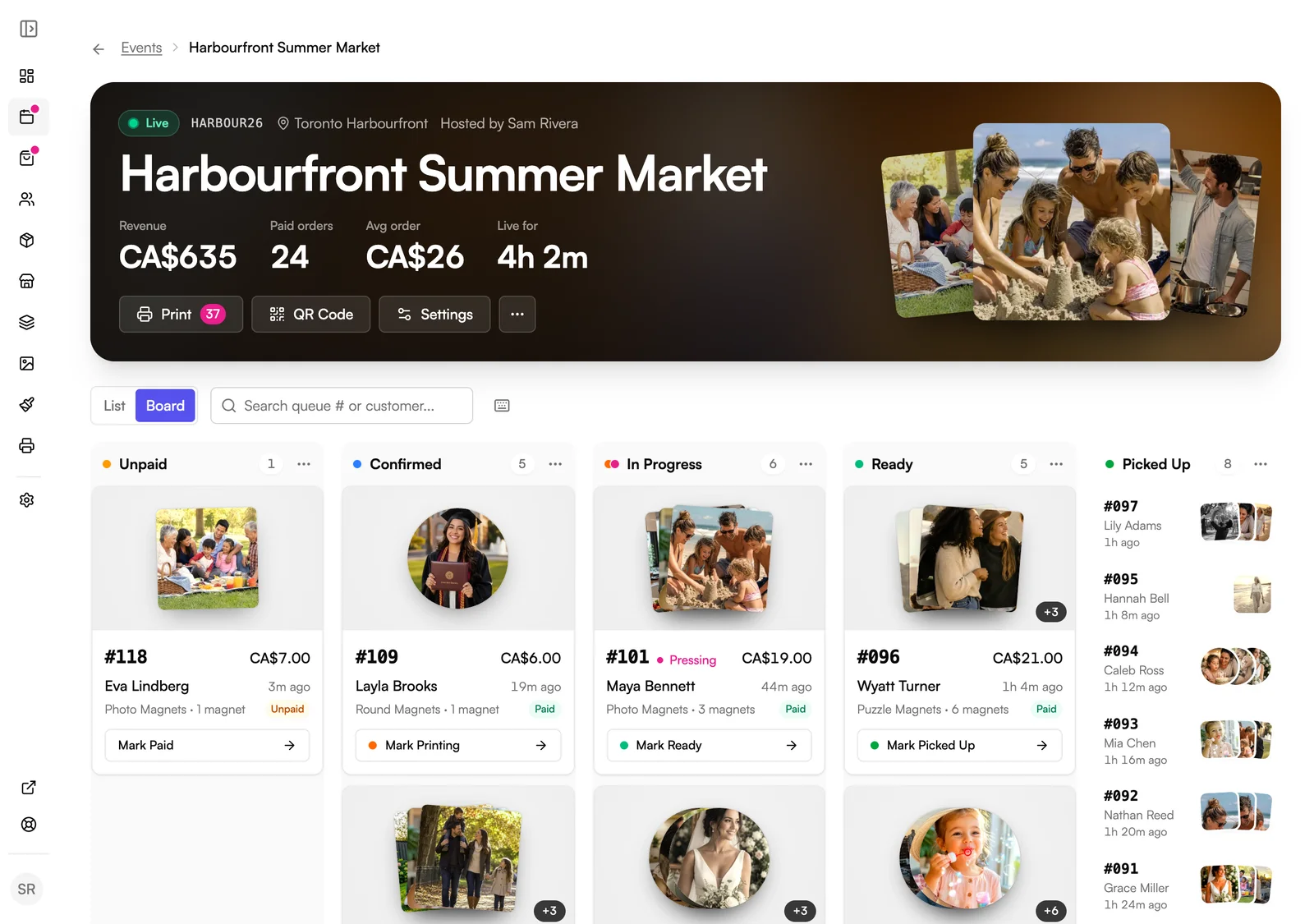
Customers scan a QR code, crop their photos, and pay while they wait. Orders land in your Print Queue ready to print, so you stay at the press.
No card needed to start. You add one when you go live. Setting up your first event takes about 30 minutes.
Sound familiar?
You're running the booth, the printer, and the till on your own.
Customers passing five different phones around to pick photos.
Orders scribbled on receipts. One always goes missing.
A line at your printer that's longer than the line at your booth.
You leave each event tired, with no idea what actually sold.
Vixie turns all of it into one queue. Customers order themselves, payments clear on their own, and your printer stays a step ahead of the line.
How it works
Three steps, from scan to pickup.
Step 1 · Scan and crop
Customers design their own magnets.
No app to download and no account to make.
Step 2 · Print
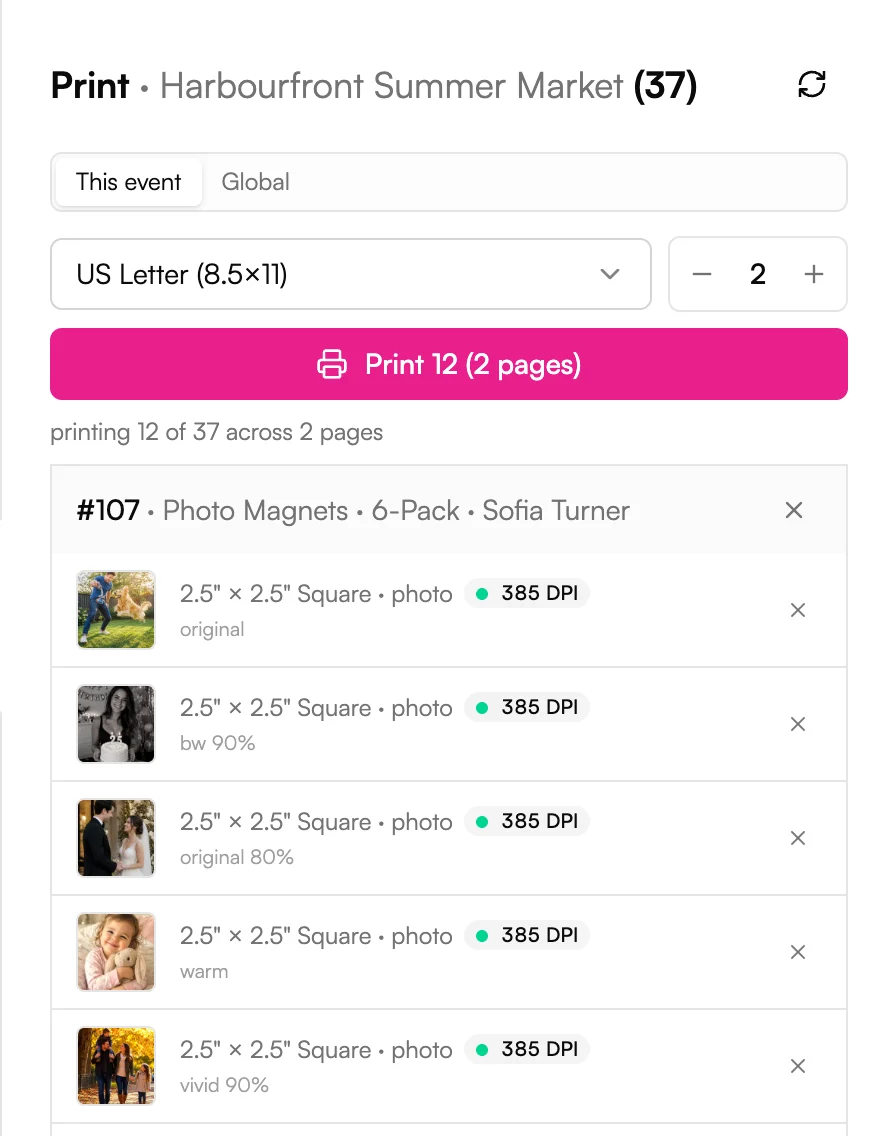
Print a full sheet, not one magnet at a time.
Works with any standard photo or sticker printer. Canon, Epson, and DNP are all fine.

Step 3 · Pick up
They come back when it's ready.
Customers can keep browsing the market while they wait.
See the full event-day playbook, from Start event to last pickup →
Every kind of event
Built for the booth. Ready for the ballroom.
Markets and fairs
Customers pay on their phone or at your table, whichever they like. Walk-ups work too.
Weddings and parties
Every guest takes home a keepsake with their names and the date. The host pays up front, and you set how many magnets each guest gets.
Corporate events
On a prepaid event the host covers every order, so guests don't pay a thing. Your logo and colours stay on every screen.
Photo booths and studios
Run the same queue at every shoot and keep one order history across all your events.
Getting paid
Four ways to take payment.
Pick one per event.
Switch it in event settings before doors open. Vixie never takes a cut, whichever you choose.
01
Online
Customers pay on their phone through your own Stripe, PayPal, Square, or SumUp account. Paid orders go straight to the queue.
02
Online or Cash
Customers pay on their phone or with cash at your table. Tap Mark Paid when you take the cash, and the order joins the queue.
03
Cash Only
Everyone pays with cash at your table. You don't need a payment account for this one.
04
Prepaid
For weddings and private events. The host covers the orders, and each guest can have a set number of magnets.
The little things
Small things that keep the line moving.
Walk-up orders
Place an order for a customer on your own device. It's marked paid in cash and joins the queue.
Live status page
Customers watch their order go from Confirmed to Ready, so you never shout names.
A sound for every order
Keep the event page open and each order a customer places plays a sound, so you don't miss one while you're pressing.
Every device at the booth
Sign in on every phone and tablet at the booth. Every tap syncs right away.
Reprint in one tap
Sheet jammed? Reprint the batch from Prints. Same magnets, fresh sheet.
End-of-event report
Close the event and see revenue, orders, magnets sold, and your busiest hours, all in one place.
Event pricing
Unlimited events on either plan.
Booth covers everything for events. Store adds a full online shop on the same URL, so you keep selling between weekends.
Booth
Sell at markets and events.Or $290 a year, with 2 months free.
7-day free trial. No card to start. Test-run your first event free, then add a card to go live.
Unlimited events and QR orders
Run a market every weekend. No extra fees for any event or order.
Unlimited products
Photo, puzzle, round, and graphic magnets. Your prices, your packs.
60-day media storage
Customer photos are kept for 60 days after the order date, then deleted automatically. Order records stay, and you can choose a shorter period.
Print Queue and Print Studio
Paid orders fill print-ready sheets for your paper and press.
Card payments on their phone
Through your own Stripe, PayPal, Square, or SumUp account, with Apple Pay and Google Pay when your provider offers them.
Discount codes
Take a percentage or a set amount off at checkout.
Branded event page
yourbrand.vixie.shop points customers to the event you're at.
1 team member
Sign in on as many phones and tablets as you like.
Store
Sell online and at events.Or $490 a year, with 2 months free.
7-day free trial. No card to start. Test-run your first event free, then add a card to go live.
Everything in Booth
Same products, same Print Queue, same events.
90-day media storage
Customer photos are kept for 90 days after the order date, then deleted automatically. Order records stay, and you can choose a shorter period.
Full online store
yourbrand.vixie.shop becomes a real shop with cart and checkout.
Store editor
Change your logo, colours, pages, and layout without code.
Collections
Group best sellers, seasonal sets, and wedding packs your way.
Shipping, pickup, or both
Set a free-shipping threshold to lift order size.
Custom domain
Use your own domain. We connect it for you.
3 team members
Give a partner or helper their own login.
Compare every plan side by side →
Already sell on Shopify or Wix? The Growth plan includes QR ordering at events. See Vixie for Shopify or Wix.
Questions
Events, answered.
Do customers need to download an app?+
Do I need a special printer?+
Can I place an order for a customer?+
Can I run a wedding or private event where the host pays?+
What if the venue Wi-Fi drops?+
Can my partner help from their own phone?+
How long does setup take?+
Keep going
Related reads.
Running a Vixie event
From Start to last pickup: the order pipeline, batch printing, and walk-ups.
Read more →Setup · 30 minGetting started with Vixie
Account, payments, products, magnet sizes, and your first event in about 30 minutes.
Read more →Puzzle magnets · 12 minSelling puzzle magnets
Set up puzzle grids, switch the product on for an event, and follow the pieces through the customer flow and Print Queue.
Read more →Same Print Queue
Sell in more places. Print from one queue.
Every channel shares your products and your Print Queue. Add one when you're ready, and the orders print side by side.
Quiet weeks between markets?
Your own online store
A full shop on yourbrand.vixie.shop, so you keep selling between events.
For vendors who want their own shop
Chasing photos by email?
Your Shopify store
Add the Magnet Customizer to the product pages you already have.
For Shopify store owners
Selling on Wix?
Your Wix store
Add the Magnet Customizer to your Wix product pages.
For Wix store owners
Run your next event on Vixie.
Set up your products, print your QR sign, and take a test order on your own phone before doors open.
No card to start. Add one to go live with an event.