Selling guide
How to sell photo magnets online.
Your product is live and the Magnet Customizer works. The only thing left is putting it in front of people. Photo magnets are easy to want once someone sees their own picture in the preview, so most of the work is getting them to your product page.
Last updated October 2026 · For Shopify stores and Vixie online stores
Jump to your first saleStart here
A product page that sells.
Before you send anyone to your store, make sure the page answers what they'll ask: what it looks like, how big it is, what it costs, and when it arrives.
Show the finished magnet
Use photos of real magnets, not just the photo that goes on them. One on a fridge, one in a hand so people see the size, and one of a whole pack laid out.
Put the size in the name
"2.5 inch photo magnets" answers the first question before anyone has to ask it. Say whether they're square or round, and whether they're pressed or flexible.
Charge for the pack
Most people want a set, not one magnet. Make the pack the price they see, like a 6-Pack for one price, so they compare packs, not magnets.
Say when it ships
Personalised orders take a few days to make. Put your turnaround on the product page, so nobody orders a birthday gift the day before the party.
Your first sale
Three ways stores get their first order.
- 1
Feature it up front
Put your magnet product on your home page, or in a collection people see first. A personalised product buried three menus deep doesn't get the chance to show off its preview.
- 2
Post the preview
Record your phone screen while you turn a photo into a magnet: pick a pack, add a photo, crop it, add a name. Fifteen seconds of that is your best ad. Share it where your buyers already are, in your Instagram stories, a local Facebook group, or TikTok.
- 3
Lean on occasions
Birthdays, weddings, pets, and holidays are what drive magnet orders. A post that matches the moment, a week or two before it, is often all it takes.
Be your own first customer. Order a pack yourself before you post anything. Then your first video can show the real thing arriving at your door, not just the preview.
The magnet calendar
Plan your posts around the occasions.
People buy photo magnets as gifts, so orders follow the calendar. Post a week or two before each one, so orders still arrive in time.
- January to February
- Valentine's Day. Couples, first dates, the dog in a heart frame.
- April to May
- Mother's Day. Grandkids on the fridge is the easiest gift there is.
- May to June
- Graduations and Father's Day. Add a name and the year as a caption.
- May to October
- Weddings. Favours for guests, and sets for the couple after.
- August to September
- Back to school. First-day photos, class photos, and lunchbox notes.
- November to December
- The holidays. Family sets, small gifts, and photos for grandparents far away.
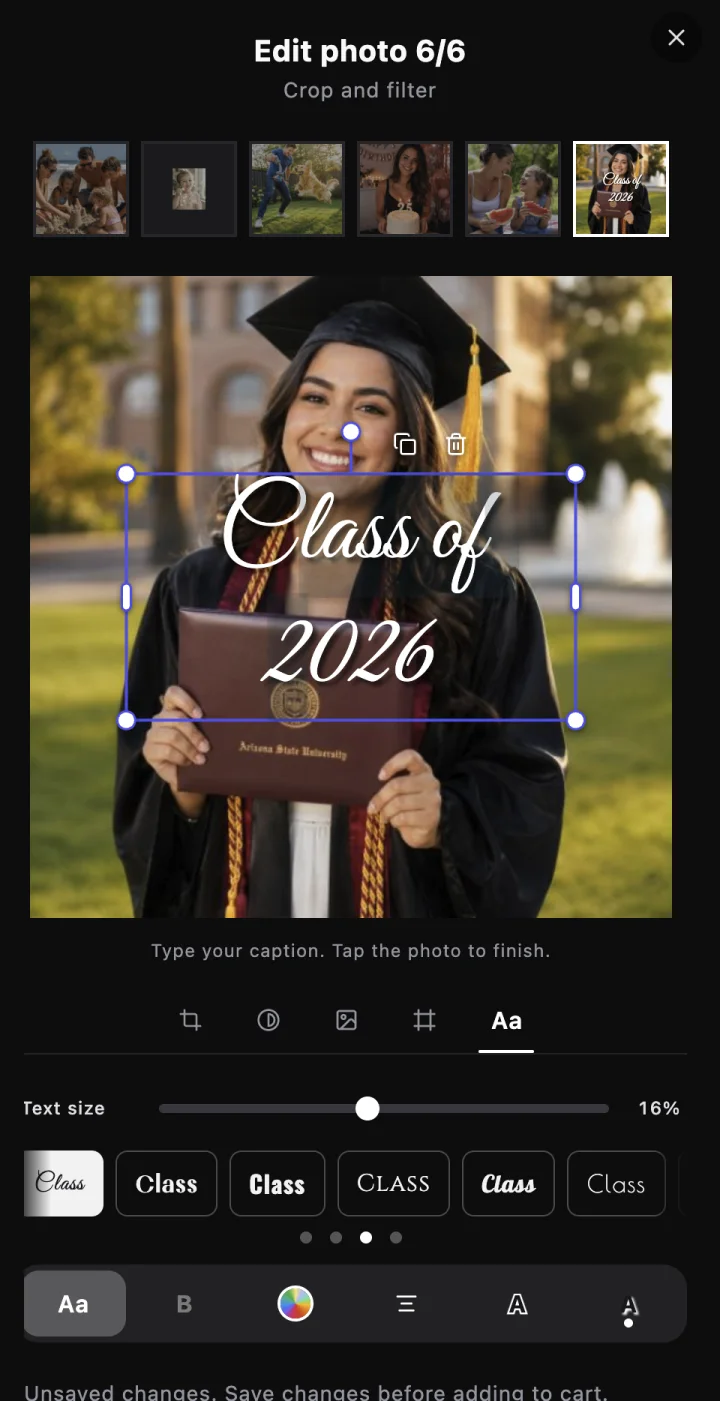

A name and the year turn a graduation photo into a gift.
After the first order
Make every order bring the next one.
- Reshare with permission. Customers can tick "You may use my photo on social media and your website" when they review their order. Real customer magnets, from people who said yes, make your best posts.
- Add a card to every package. Your shop name and website on a small card is how the gift becomes the next order, from the person who received it.
- Offer a bigger set. A puzzle magnet or a 9-Pack gives repeat buyers something new, from the same photos.
- Sell where your buyers are. Markets, school fairs, and weddings are full of people with photos on their phones. The same products and Print Queue work at events too.
Questions
Selling photo magnets FAQ
How much should I charge for photo magnets?+
What photo quality do customers need?+
Should I offer free shipping?+
Can I share my customers' photos?+
Can customers add names and dates?+
Do I need Shopify to sell online?+
Keep going
Related reads.
Shopify orders, from product to package
Link a product, see what customers do on your product page, then print the order and ship it from Shopify.
Read more →Business guideStarting a photo magnet business
Gear, what each magnet costs you, pricing, and the booth playbook for new vendors.
Read more →Print resolutionWhat resolution to print photos
How much resolution a photo needs to print sharp, how to check your photo’s pixels, and the biggest size you can safely print.
Read more →Ready to sell photo magnets online?
Sell on your Shopify store, or let Vixie run your online store for you.